CPU Cooling

Technical specifications, key pros & cons, and real-time price comparison of 152 CPU Cooling models.

Filters
Brand
Heat sink details
Number of heatsinks
Heatsink material type
Heat Sink Size
Heatsink weight
Heat pipe features
Number of Heat Pipes
Heat Pipe Type
Heat Pipe Material and Contact Surface
Processor Contact Surface Type
Heat Pipe Diameter
Cooling system details
Number of fans
Maximum nominal rotation speed
Minimum nominal rotation speed
Fan features
Fan Size
Fan Speed Control System
Fan Electrical Connector Type
Fan Operating Voltage
Maximum Airflow Capacity (CFM)
Maximum Air Pressure (mm/H2O)
Fan Power Consumption
Fan Core Technology
Air conditioning features
Maximum noise produced
Minimum noise produced
Aesthetic features
Lighting
General features
Mounting Method on Motherboard
Compatibility with AMD sockets
Compatibility with Intel sockets
Overall dimensions
Aesthetic features
Color Options
Total Device Weight
Lighting
Lighting
Lighting features
Lighting system type
Lighting voltage
Lighting connector type
Technical features
Additional Features
Additional features and options
Box Contents
Price Range
Up to
User Rating
Sort by:
5.0
(4)
31.99 $
  • Color Options
    -
  • Additional Features
    -
  • Box Contents
    -
  • Lighting
    true
  • Mounting Method on Motherboard
    Vertical
  • Number of fans
    -
31.99 $
5.0
(4)
5.0
(2)
48.82 $
  • Color Options
    -
  • Additional Features
    -
  • Box Contents
    -
  • Lighting
    true
  • Mounting Method on Motherboard
    -
  • Number of fans
    -
48.82 $
5.0
(2)
5.0
(2)
73.41 $
  • Color Options
    -
  • Additional Features
    -
  • Box Contents
    -
  • Lighting
    false
  • Mounting Method on Motherboard
    Vertical
  • Number of fans
    -
73.41 $
5.0
(2)
0.0
(1)
81.59 $
  • Color Options
    Snow White
  • Additional Features
    3.95-inch IPS LCD Screen (480x480 resolution), Magnetic Top Cover, Silicone Fan Corner Pads
  • Box Contents
    CPU Cooler, Fans, Mounting Hardware, Thermal Paste, Manual
  • Lighting
    ARGB
  • Mounting Method on Motherboard
    Intel/AMD Brackets
  • Number of fans
    2
81.59 $
0.0
(1)
5.0
(1)
34.90 $
  • Color Options
    -
  • Additional Features
    -
  • Box Contents
    -
  • Lighting
    false
  • Mounting Method on Motherboard
    Vertical
  • Number of fans
    -
34.90 $
5.0
(1)
5.0
(6)
124.95 $
  • Color Options
    -
  • Additional Features
    -
  • Box Contents
    -
  • Lighting
    false
  • Mounting Method on Motherboard
    Vertical
  • Number of fans
    -
124.95 $
5.0
(6)
0.0
(1)
99.99 $
  • Color Options
    Black
  • Additional Features
    Pre-applied thermal paste, Daisy-chainable fan connections, CORSAIR AirGuide technology
  • Box Contents
    3x RS120 ARGB Fans
  • Lighting
    -
  • Mounting Method on Motherboard
    -
  • Number of fans
    3
99.99 $
0.0
(1)
5.0
(2)
99.95 $
  • Color Options
    -
  • Additional Features
    -
  • Box Contents
    -
  • Lighting
    false
  • Mounting Method on Motherboard
    Vertical
  • Number of fans
    -
99.95 $
5.0
(2)
5.0
(1)
62.90 $
  • Color Options
    -
  • Additional Features
    -
  • Box Contents
    -
  • Lighting
    true
  • Mounting Method on Motherboard
    Horizontal
  • Number of fans
    -
62.90 $
5.0
(1)
5.0
(2)
89.95 $
  • Color Options
    -
  • Additional Features
    -
  • Box Contents
    -
  • Lighting
    false
  • Mounting Method on Motherboard
    Vertical
  • Number of fans
    -
89.95 $
5.0
(2)
5.0
(2)
35.82 $
  • Color Options
    -
  • Additional Features
    -
  • Box Contents
    -
  • Lighting
    true
  • Mounting Method on Motherboard
    Vertical
  • Number of fans
    -
35.82 $
5.0
(2)
5.0
(1)
55.92 $
  • Color Options
    -
  • Additional Features
    -
  • Box Contents
    -
  • Lighting
    true
  • Mounting Method on Motherboard
    Vertical
  • Number of fans
    -
55.92 $
5.0
(1)
5.0
(3)
89.95 $
  • Color Options
    -
  • Additional Features
    -
  • Box Contents
    -
  • Lighting
    false
  • Mounting Method on Motherboard
    -
  • Number of fans
    -
89.95 $
5.0
(3)
5.0
(1)
32.99 $
  • Color Options
    -
  • Additional Features
    -
  • Box Contents
    -
  • Lighting
    true
  • Mounting Method on Motherboard
    Vertical
  • Number of fans
    -
32.99 $
5.0
(1)
5.0
(2)
28.68 $
  • Color Options
    -
  • Additional Features
    -
  • Box Contents
    -
  • Lighting
    true
  • Mounting Method on Motherboard
    Vertical
  • Number of fans
    -
28.68 $
5.0
(2)
0.0
(1)
139.95 $
  • Color Options
    -
  • Additional Features
    -
  • Box Contents
    -
  • Lighting
    false
  • Mounting Method on Motherboard
    Vertical
  • Number of fans
    -
139.95 $
0.0
(1)
0.0
(1)
25 $
  • Color Options
    -
  • Additional Features
    -
  • Box Contents
    -
  • Lighting
    false
  • Mounting Method on Motherboard
    Vertical
  • Number of fans
    -
25 $
0.0
(1)
5.0
(1)
25 $
  • Color Options
    -
  • Additional Features
    -
  • Box Contents
    -
  • Lighting
    false
  • Mounting Method on Motherboard
    Vertical
  • Number of fans
    -
25 $
5.0
(1)
0.0
(1)
29.45 $
  • Color Options
    -
  • Additional Features
    -
  • Box Contents
    -
  • Lighting
    true
  • Mounting Method on Motherboard
    Vertical
  • Number of fans
    -
29.45 $
0.0
(1)
5.0
(2)
139.90 $
  • Color Options
    -
  • Additional Features
    -
  • Box Contents
    -
  • Lighting
    true
  • Mounting Method on Motherboard
    Vertical
  • Number of fans
    -
139.90 $
5.0
(2)

Deep Dive into CPU Cooling Technologies and Performance Metrics

Understanding CPU Thermal Management

Modern CPUs, particularly high-core-count processors and those operating at elevated clock speeds, generate considerable heat as a byproduct of electrical resistance and transistor switching. Without effective thermal management, these processors quickly reach their thermal junction maximum (TjMax), initiating a process known as thermal throttling. Throttling reduces clock speeds and voltage to prevent damage, but it severely degrades performance. A capable CPU cooler actively transfers this waste heat away from the processor die to a larger surface area where it can be dissipated into the surrounding environment, ensuring sustained peak performance.

Air Cooling Architecture

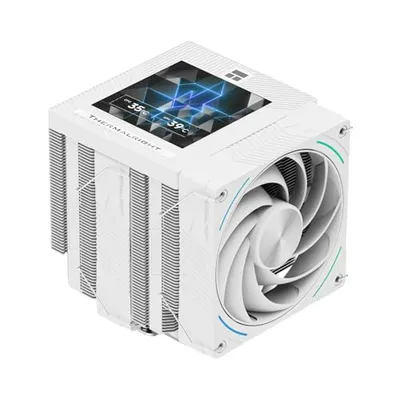
Air coolers primarily consist of a baseplate, heat pipes, a fin stack (radiator), and one or more fans. The baseplate, typically made of copper or nickel-plated copper, makes direct contact with the CPU's integrated heat spreader (IHS) via a layer of thermal interface material (TIM). Heat then transfers from the baseplate into the heat pipes. These hermetically sealed copper tubes contain a working fluid that evaporates at the hot end, travels as vapor to the cooler, finned end, condenses back into liquid, and returns to the hot end via a wicking structure. This phase change process is exceptionally efficient at transferring heat. The fin stack, usually aluminum, provides a massive surface area for heat exchange, and fans push air through these fins, expelling the heat. Key performance metrics for air coolers include fin density, heat pipe count and diameter, fan static pressure, and airflow volume.

All-in-One (AIO) Liquid Cooling Systems

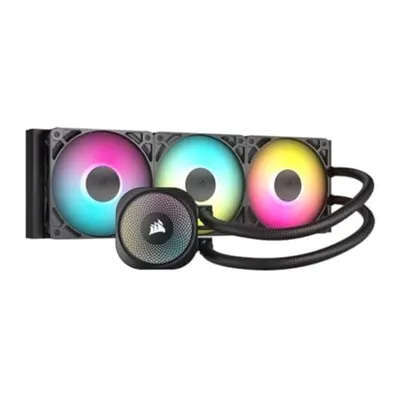
AIO liquid coolers offer an alternative by circulating a liquid coolant through a closed loop. The system comprises a cold plate (often integrated with the pump), flexible tubing, a radiator, and fans. The cold plate, positioned over the CPU, absorbs heat from the IHS. A small pump circulates the heated liquid to the radiator, which is typically mounted to a case fan location. The radiator, similar in principle to an air cooler's fin stack, uses fans to dissipate the heat from the liquid into the ambient air. Cooled liquid then returns to the CPU cold plate. AIOs can offer superior thermal performance for high-TDP CPUs, especially in scenarios where large air coolers might interfere with RAM or case clearance, and they often provide a cleaner aesthetic within the build. Radiator size (e.g., 120mm, 240mm, 360mm) directly correlates with heat dissipation capacity, with larger radiators generally offering better performance.

Thermal Interface Material (TIM) Significance

Regardless of the cooling method, thermal interface material (thermal paste) is crucial. Microscopic imperfections exist on both the CPU's IHS and the cooler's baseplate, creating tiny air gaps. Air is a poor conductor of heat. TIM fills these microscopic voids, significantly improving the thermal conductivity between the CPU and the cooler. Common types include silicone-based, ceramic-based, and metallic-based compounds, with liquid metal offering the highest conductivity but requiring careful application due to its electrical conductivity.