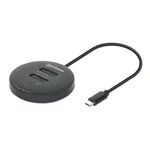
For professionals and enthusiasts demanding rapid and reliable data transfer solutions, the Manhattan Dual-Bay M.2 NVMe SSD Duplicator / Clone Station emerges as a compelling proposition. This device directly addresses the burgeoning need for efficient management of high-speed NVMe storage, allowing users to duplicate or clone entire drives without the need for a host computer. Its robust design and focus on NVMe interfaces position it as a critical tool for system builders, IT technicians, and power users who frequently work with multiple solid-state drives.
The core functionality revolves around its dual-bay configuration, specifically engineered to accommodate M.2 NVMe SSDs. This specialization ensures optimal performance, leveraging the full bandwidth capabilities of the NVMe protocol. The standalone cloning feature simplifies complex data migration tasks, transforming what could be a time-consuming process into a streamlined operation. By eliminating the intermediary of a PC, it not only saves time but also reduces the potential for software-related errors during the cloning process, making it an invaluable asset for maintaining data integrity and operational efficiency.
Key Features and Performance
The standout feature of the Manhattan Dual-Bay M.2 NVMe SSD Duplicator is its direct, offline cloning capability. Users can insert two M.2 NVMe SSDs – one source and one target – and initiate a 1:1 copy of the entire drive content, including partitions, boot sectors, and operating systems. This is particularly useful for setting up multiple identical workstations, migrating existing system drives to faster NVMe storage, or creating exact backups. The device is designed to support the high transfer speeds inherent to NVMe SSDs, ensuring that the cloning process is as fast as the drives themselves allow, limited primarily by the read/write performance of the installed SSDs.
Build and Connectivity
Constructed with durability in mind, the station likely features a robust casing designed to dissipate heat effectively, a crucial consideration for high-performance NVMe drives that can generate significant thermal output during sustained read/write operations. Connectivity typically involves a power adapter for standalone operation and potentially a USB interface for optional connection to a host PC, allowing it to function as an external drive enclosure for individual M.2 NVMe SSDs when not in cloning mode. The user interface is generally straightforward, often employing simple button controls and LED indicators to display the cloning status, progress, and any potential errors.