Artificial intelligence has largely been confined to conversational interfaces, where users pose questions and receive textual answers. This paradigm, exemplified by tools like ChatGPT and Claude, is effective for basic research and information retrieval. However, it underutilizes a significant capability of modern AI: the ability to perform complex tasks directly on a user's machine, interacting with real files and applications from start to finish. Anthropic's Claude Cowork emerges as a groundbreaking solution, designed to transform AI from a query tool into an active participant in the knowledge work process.
Claude Cowork is conceptualized as an agentic desktop tool specifically tailored for non-technical professionals and knowledge workers. Unlike traditional AI assistants that require coding expertise, Claude Cowork operates through intuitive interactions, allowing users to delegate tasks and receive completed deliverables. This article provides a comprehensive overview of Claude Cowork, detailing its operational mechanics, setup procedures, and strategies for productive utilization, focusing on its transition from a conversational agent to a task-execution platform.
What is Claude Cowork and How Does it Differ from Chat?
The fundamental distinction between Claude Chat and Claude Cowork lies in their core functions: Chat facilitates conversation, while Cowork orchestrates work sessions. In a chat interface, the user engages in a back-and-forth dialogue, manually copying and pasting information. Claude Cowork, conversely, empowers users to assign a specific goal and designate a working folder on their computer. The AI agent then autonomously executes the task, which may involve reading, editing, or creating files, and running code within a secure, sandboxed environment, ultimately delivering a finished product.
Several key features differentiate Cowork from standard chat interfaces, enabling its advanced task execution capabilities. These include its direct operation on the user's desktop, integrating with local files, folders, and applications. Users can grant Cowork access to a designated workspace folder, within which it can read, edit, and create files. This controlled access ensures that the AI can perform tangible tasks without overstepping its boundaries. Furthermore, a crucial component is its sandboxed environment, which provides a secure space for executing code, generating documents, and processing data without impacting the user's system integrity.
Key Differentiating Features of Claude Cowork
- Desktop Integration: Operates directly within the user's familiar desktop environment, interacting with local files and applications.
- Workspace Folder Access: Allows users to specify a folder for the AI to work within, granting read, edit, and create permissions exclusively for that directory.
- Sandboxed Execution Environment: Provides a secure, isolated space for running code, processing data, and generating outputs, ensuring system safety.
Claude Cowork is particularly adept at handling high-effort, repeatable tasks. Examples include reorganizing extensive collections of PDFs, compiling structured reports from raw source files, extracting critical data from dense legal or financial documents, and consolidating outputs from multiple disparate applications. The emphasis on a non-technical user interface ensures that individuals without coding backgrounds can leverage these advanced capabilities seamlessly. Claude Cowork is currently available to users on all paid Claude plans through the dedicated desktop application.
Getting Set Up with Claude Cowork
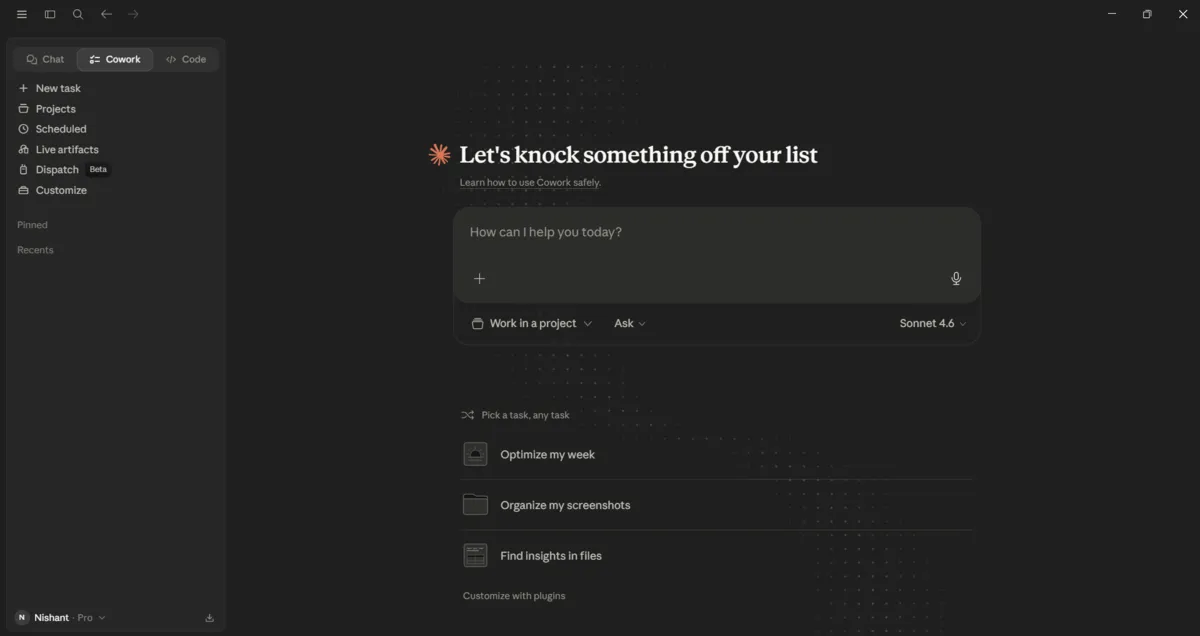
The setup process for Claude Cowork is designed for simplicity and speed. Prospective users are required to download the Claude desktop application, log in using their credentials for a paid Claude plan, and then navigate to the Cowork mode within the application. This straightforward initial step ensures accessibility for a broad range of users, regardless of their technical expertise.
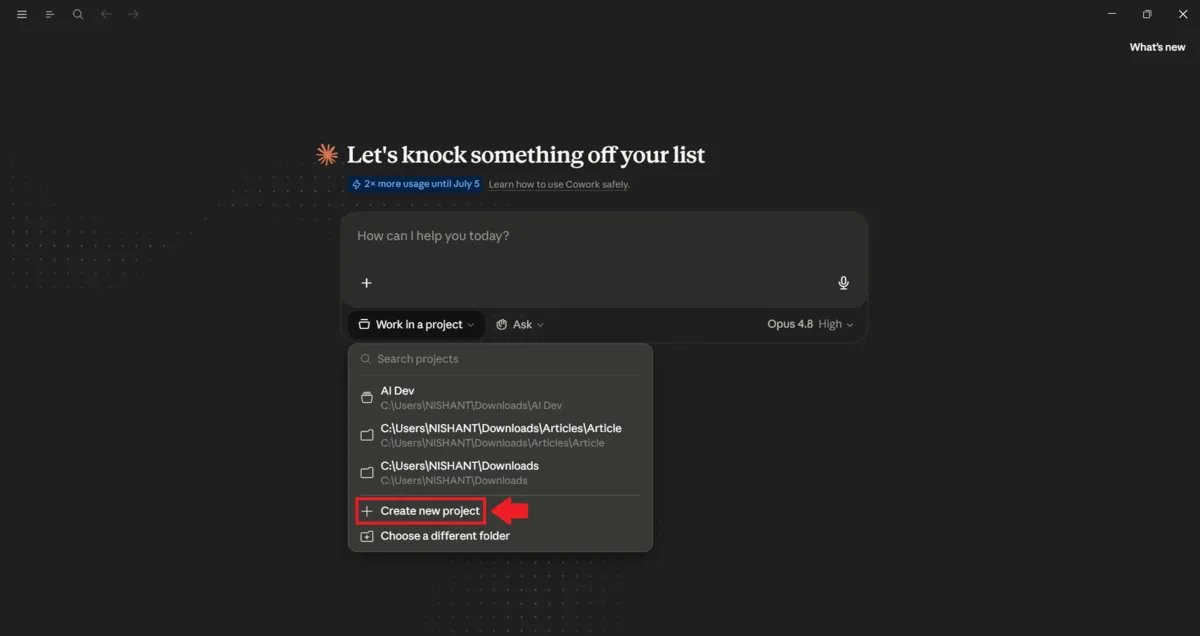
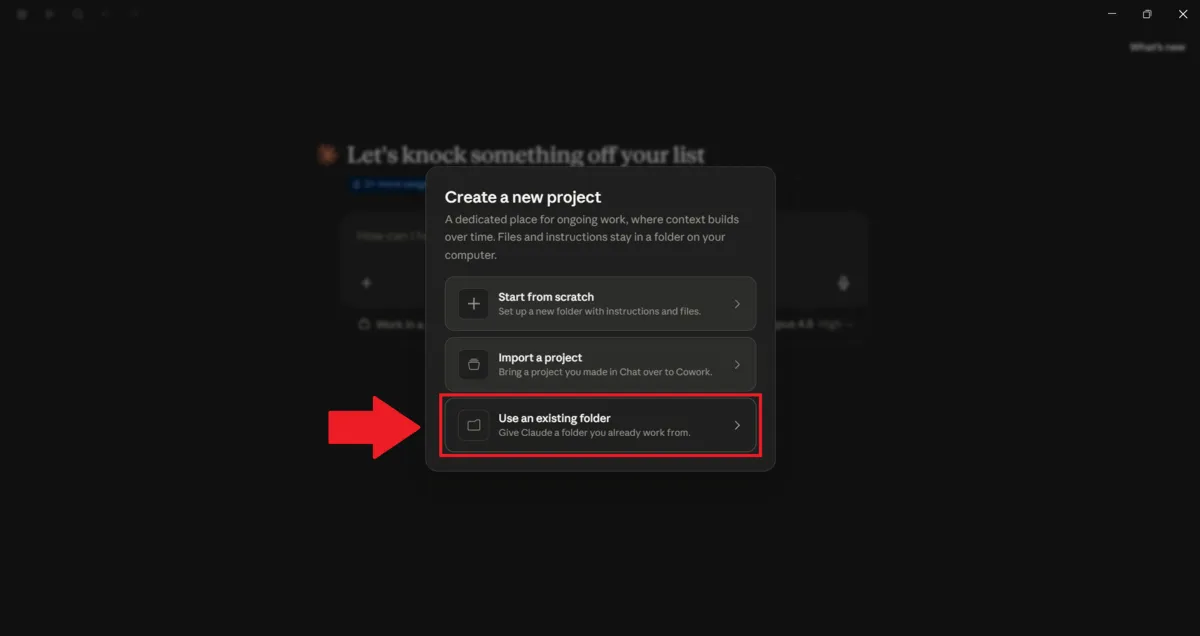
A critical step that new users may overlook, yet it is paramount for effective operation, is assigning a dedicated working folder to Cowork. This folder essentially defines the AI's operational scope and access privileges. Claude is restricted to interacting solely within the confines of this designated folder, ensuring that its actions are limited to the user's explicit intent and providing a vital layer of security. It is strongly recommended that users begin by selecting a single, low-stakes folder—such as a project's working directory, a temporary downloads folder, or a collection of draft documents—rather than granting access to the entire desktop on the initial setup.
Best Practices for Initial Setup
- Download the Claude desktop application.
- Sign in with an active paid Claude plan.
- Select 'Cowork' mode.
- Crucially, assign a specific, low-stakes folder as the workspace.
Executing Your First Task: The Claude Cowork Task Loop
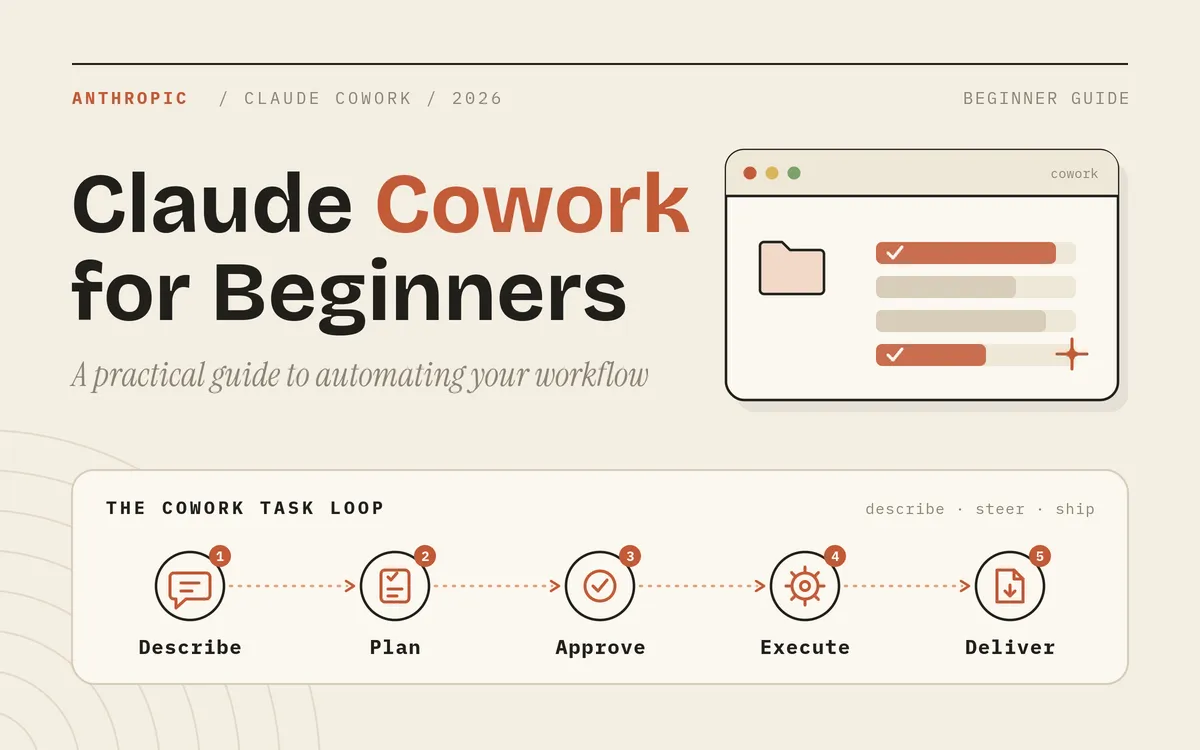
When a task is assigned in Claude Cowork, the AI does not immediately produce a result. Instead, it follows a structured task loop designed for clarity, collaboration, and user control. This iterative process ensures that the user remains informed and in command throughout the task execution.
The loop begins with the user articulating the task in clear, natural language. For example, a user might request, "Organize this folder of invoices by month and flag any duplicate entries." Following this, Claude formulates a plan and, for any significant actions, presents it to the user for approval before proceeding. This is a critical juncture where the user can either approve the plan, suggest modifications, refine the scope, or explicitly instruct Claude to skip certain steps. Once the plan is approved or adjusted, Claude executes the task step by step, providing real-time updates that allow the user to monitor progress and intervene if necessary by stopping the process at any point.
Phases of the Claude Cowork Task Loop
- Task Description: User provides a clear, natural language description of the desired outcome.
- Plan Formulation: Claude generates a step-by-step plan and presents it for user review and approval.
- User Approval/Steering: User approves the plan, or provides feedback to adjust scope, sequence, or specific actions.
- Execution: Claude carries out the approved plan, with user oversight and the ability to halt execution.
- Deliverable Handover: Claude presents the completed work for user review and further iteration.
This process fundamentally shifts the user's role from a simple prompter to a project manager. The user's responsibility is to set a precise goal, review the AI's proposed plan, and provide necessary course corrections. The quality of the final output is directly correlated with the clarity of the task description and the effectiveness of user guidance within the loop, rather than mere prompt engineering.
Consider the difference between a vague request like "Clean up my folder" and a specific instruction: "In this folder, rename every PDF to the format YYYY-MM-VendorName, move any files older than 2024 into a newly created \/archive subfolder, and provide a list of files that you were uncertain about instead of making assumptions." The latter, by providing explicit goals, formats, and contingency plans for uncertainty, leads to a dramatically different and more useful result from the same tool.
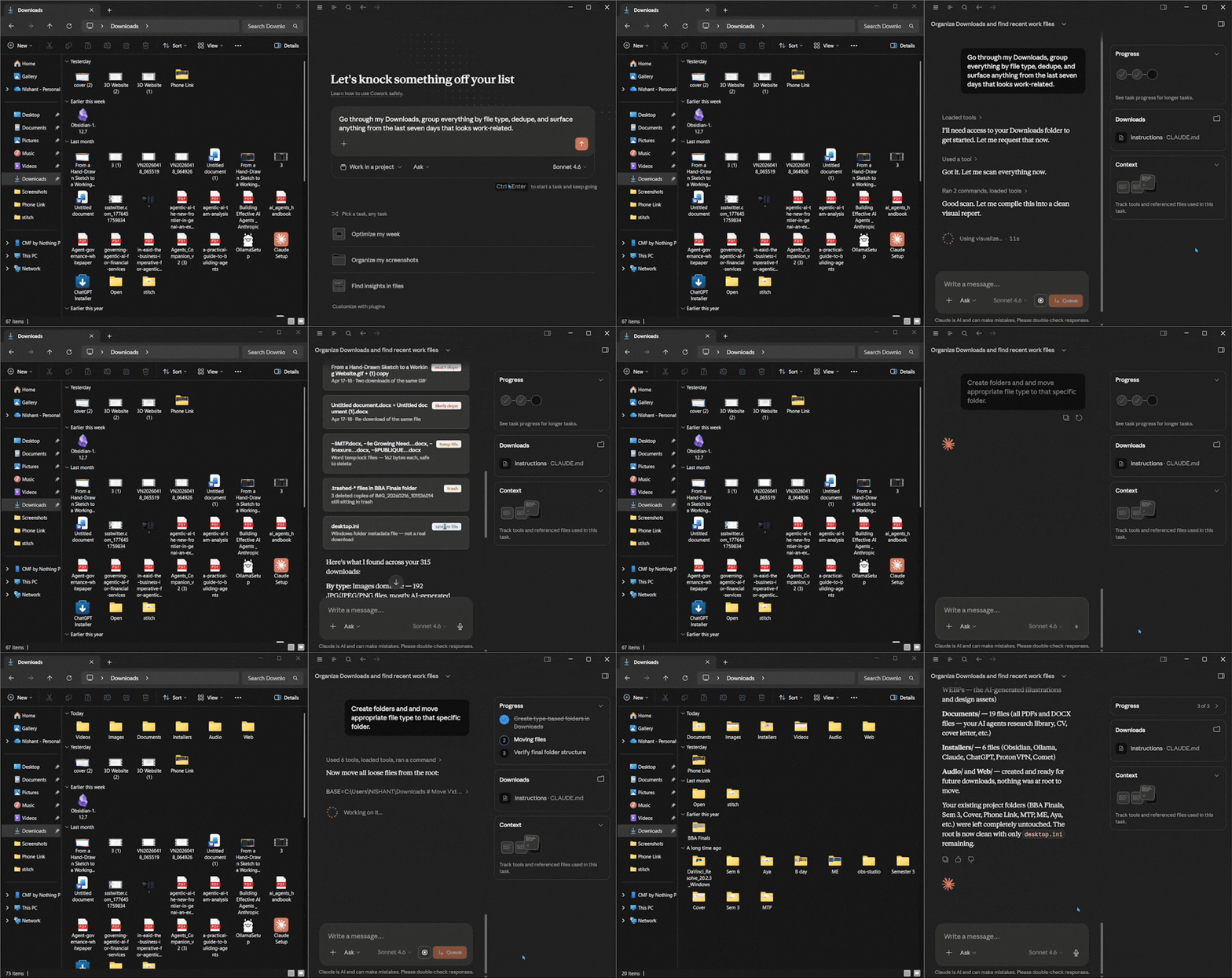
Enhancing Task Clarity for Optimal Results
- Provide specific file naming conventions.
- Clearly define folder structures and file movement rules.
- Specify actions for ambiguous or uncertain situations.
Providing Context to Claude Cowork
The single most significant factor influencing the quality of Claude Cowork's output is the context provided to the AI. Claude's understanding is limited to the information explicitly given by the user and the contents of the designated working folder. Therefore, furnishing comprehensive and relevant context upfront is essential for the AI to formulate an effective plan and execute tasks accurately.
In practical terms, this means clearly articulating the ultimate objective and the intended audience for the task. For instance, specifying "a one-page summary for a non-technical executive" will naturally lead to a different output than requesting "detailed technical notes for the engineering team." Additionally, users can enhance context by placing reference files directly within the working folder. These might include brand guidelines, examples of previously approved reports, or relevant historical data that Claude can reference during its task execution.
Key Strategies for Contextual Input
- Define Goal and Audience: Clearly state the purpose and intended recipient of the output.
- Supply Reference Files: Include relevant documents such as brand guides, style examples, or data sets in the workspace folder.
- Specify Preferences: Communicate preferred tone, formatting, and the definition of a completed task.
The use of Claude Projects further consolidates context, enabling users to maintain necessary files, instructions, and background information in a centralized location. This prevents the need for repeated explanations across different sessions. By creating a dedicated project for each ongoing topic—such as a client account, a product launch, or a recurring report—all tasks within that project can begin with pre-loaded, relevant context, streamlining the workflow and improving efficiency.
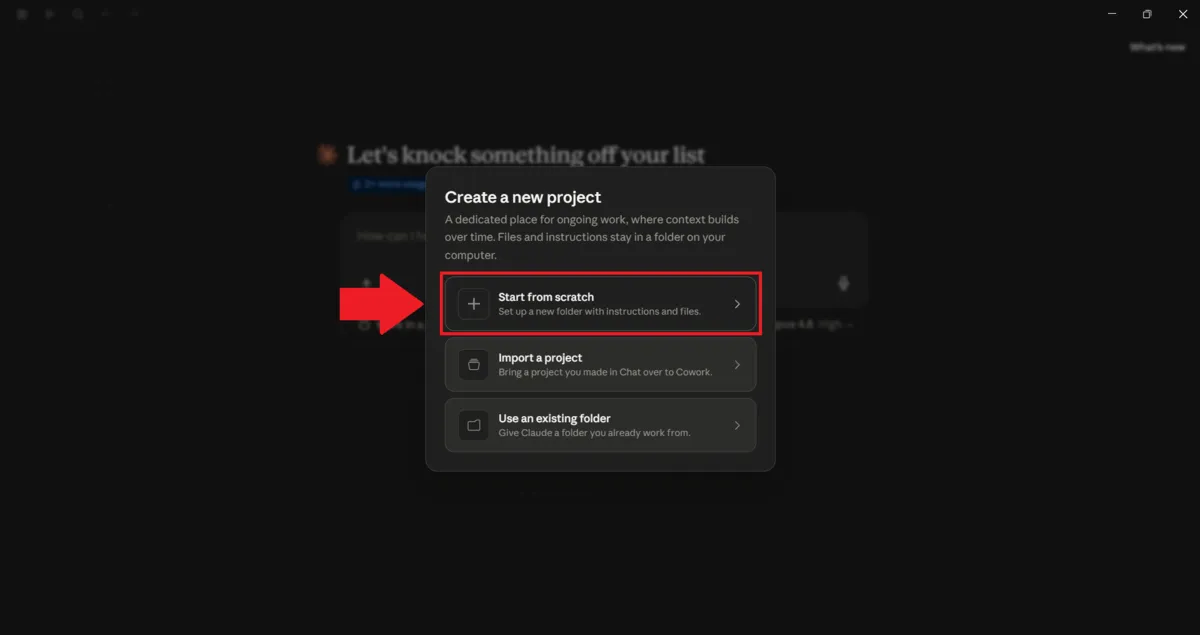
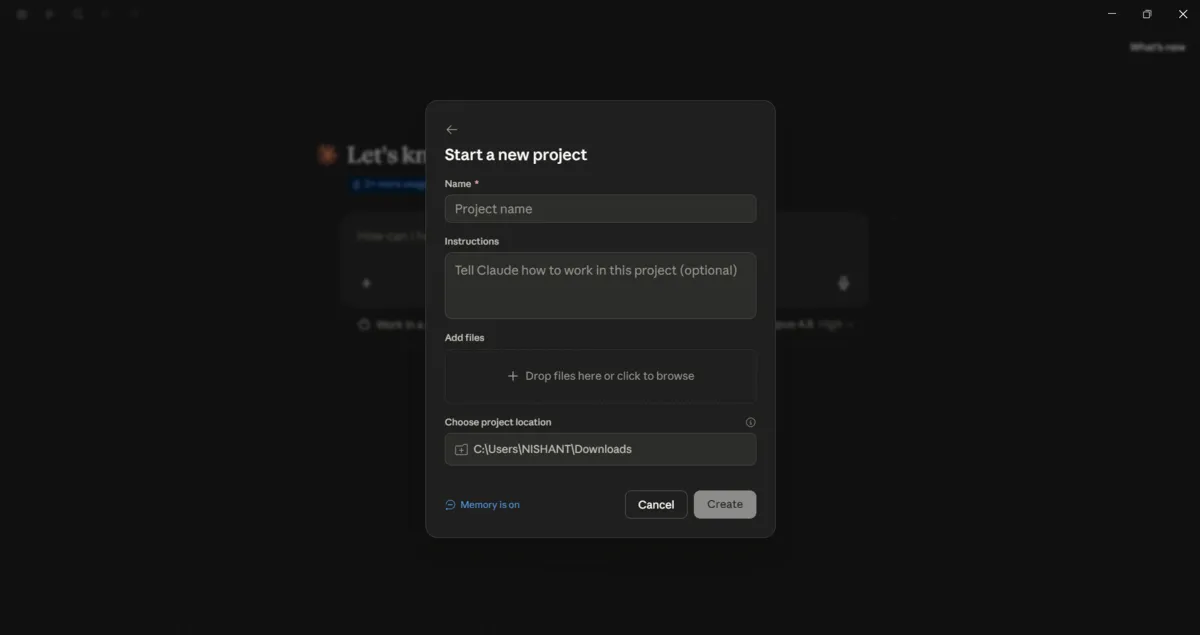
Customizing Claude Cowork: Skills, Plugins, and Scheduled Tasks
While Claude Cowork functions as a capable generalist out of the box, its true potential is unlocked through customization, allowing it to evolve into a specialized assistant tailored to individual needs and workflows. The platform supports several features to achieve this personalization.
Leveraging Skills
Skills are predefined sets of instructions and helper scripts that Claude automatically employs when a task aligns with their functionality. Users might benefit from existing skills without explicit activation; for instance, requesting "a presentation on Q3 results" may yield a well-structured deck rather than a simple list of bullet points, thanks to underlying skills. These skills are designed to activate contextually when relevant. While users don't need to manually enable them, understanding their existence can be beneficial, and users can also add custom skills that reflect their specific brand identity, communication style, or operational procedures.
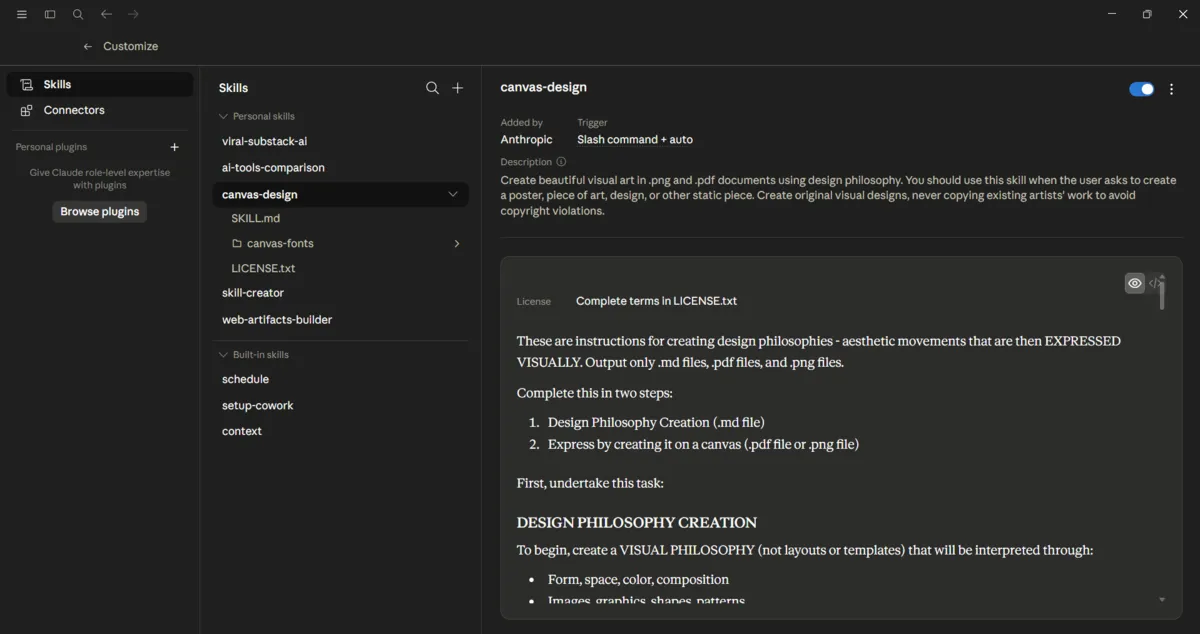
Utilizing Plugins for Specialization
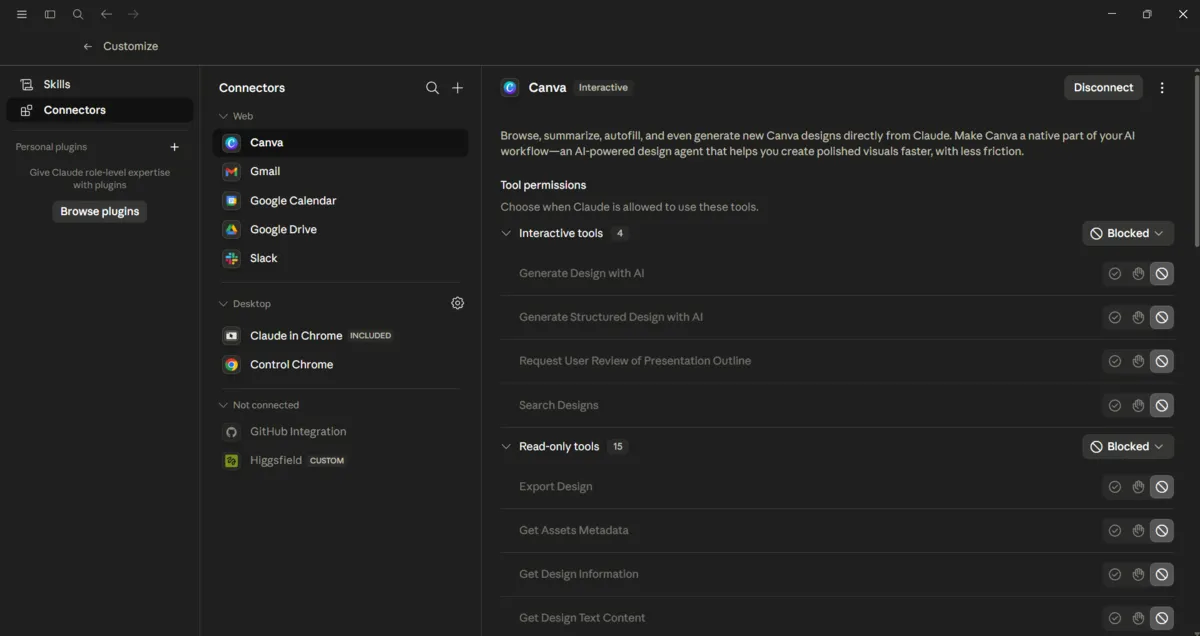
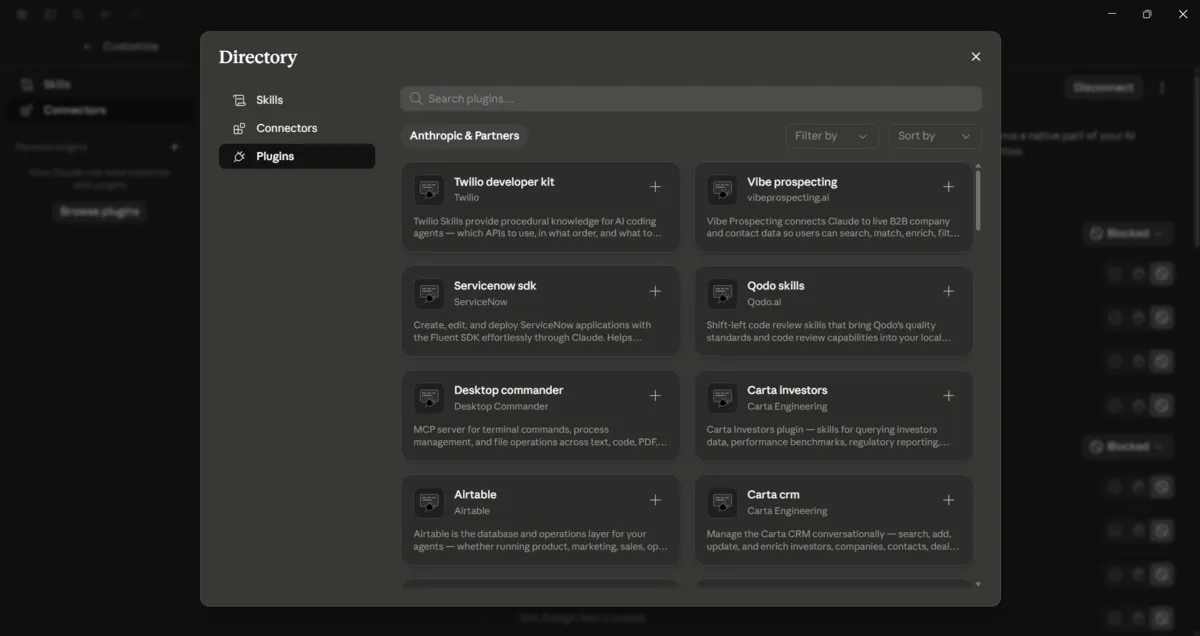
Plugins serve as a powerful mechanism for transforming Claude Cowork into a domain-specific specialist. These are curated collections of tools, connectors, and specialized skills that users can select based on their professional role or industry. By installing plugin sets relevant to their field, users can significantly enhance the tool's suitability for their unique workflow, making Claude Cowork a more integrated and effective assistant.
Implementing Scheduled Tasks

Claude Cowork enables users to automate routine tasks by scheduling them to run at specific intervals. This includes daily, weekly, or at predetermined times. A practical application is setting up a daily digest, such as a "what's trending" report that aggregates information from various connected tools and is delivered each morning before the workday begins. This feature eliminates the need for manual initiation of recurring tasks, ensuring consistency and saving valuable time.
Claude Cowork in Practical Application
Claude Cowork demonstrates significant utility across various demanding tasks, streamlining complex workflows and enhancing productivity for knowledge workers.
Automating File and Document Management
The platform excels in file organization and management. By directing Cowork to a folder of source files, users can generate clear, organized drafts. Its capabilities include renaming, sorting, eliminating duplicate entries, and highlighting critical information within cluttered directories. Furthermore, when tasked with creating spreadsheets, Cowork generates functional .xlsx files complete with formulas and formatting. These files can be further refined through iterative requests, such as adding variance columns or performing data pivots by specific regions.
Scaling Research and Analysis
Another primary use case for Claude Cowork is its capacity to process and analyze information at a scale that would be impractical for manual review. Users can pose complex questions and provide a set of source documents or allow the AI to access web data and connected applications. Claude then operates agentically, conducting iterative searches and synthesizing information into comprehensive reports. This capability is invaluable for tasks such as competitive research, due diligence processes, or extensive literature reviews, tasks that typically require significant time investment.
Responsible AI Usage: Permissions, Oversight, and Model Selection
Granting an AI agent access to personal files and applications necessitates a robust approach to safety and responsible usage. Claude Cowork’s safety model is built upon continuous user oversight. The AI presents its execution plan for approval before taking action, requests explicit permission before utilizing any new application, and strictly limits its operational scope to the user-designated folder. Critical decisions remain under the user's purview, and the user can halt the process at any stage, ensuring they remain in full control.
Regarding permissions, usage, and model selection, the principle is to match the AI model to the task. Lighter, faster models are suitable for routine, well-defined tasks, while more powerful, computationally intensive models are better suited for complex reasoning and multi-step operations. Optimizing the balance between speed, cost, and quality hinges on selecting the appropriate model for each specific job.
Troubleshooting Common Issues and Next Steps
Many initial challenges with Claude Cowork can be preempted by adhering to best practices. Common pitfalls include neglecting to assign a working folder, providing overly vague task descriptions, or approving plans without thorough review. Most instances where Cowork performs an unintended action can be traced back to insufficient context or imprecise goals. Fortunately, these issues are readily addressable once the user understands the task loop and the importance of clear communication.
Initiating Practical Use of Claude Cowork
The most effective strategy for adopting Claude Cowork is to avoid attempting to master all its features simultaneously. Instead, identify a single, recurring task that presents a bottleneck or is particularly tedious—such as preparing a weekly report or organizing an unruly folder—and create a dedicated project around it. The fundamental steps involve assigning a workspace folder, defining a clear objective, carefully reviewing the AI's proposed plan, and monitoring its execution.
As users become more comfortable, they can progressively integrate additional functionalities, such as connecting new data sources or implementing scheduled tasks. After a few weeks of consistent use, the transformative difference between using AI as a sophisticated search engine and as a collaborative teammate that actively performs work becomes readily apparent, making it difficult to revert to older methods.
For those interested in deepening their understanding and proficiency with Claude Cowork, Anthropic offers a complimentary, hands-on course titled "Introduction to Claude Cowork." This course concludes with a quiz to assess comprehension and provides a structured pathway from initial setup to confident, daily application. The most direct route to proficiency, however, remains practical engagement: open Claude, designate a folder, and assign it a real task to perform.