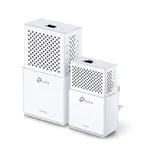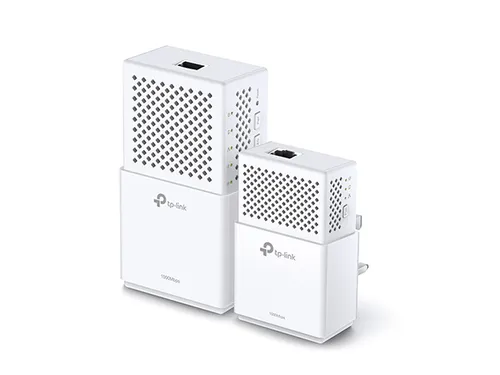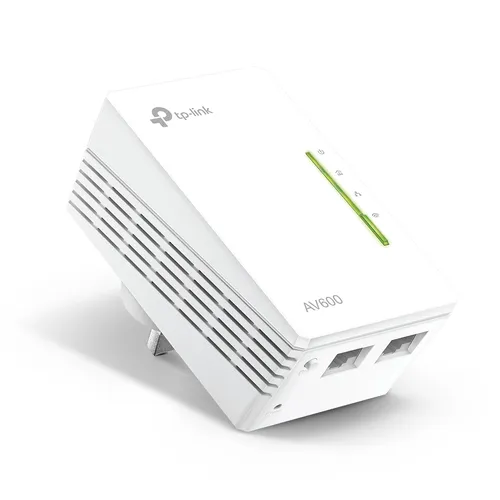


TP-Link TL-WPA4220KIT Powerline 600 Wi-Fi Extender
Specifications
Performance
Performance
| Maximum data transfer rate |
600 Mbit/s
|
|---|---|
| Ethernet LAN |
Yes
61% have it
|
| Ethernet LAN interface type |
Fast Ethernet
|
| Ethernet LAN data rates |
10,100 Mbit/s
|
| Ethernet LAN (RJ-45) ports |
2
|
| Wi-Fi |
Yes
67% have it
|
| Top Wi-Fi standard |
Wi-Fi 4 (802.11n)
|
| Wi-Fi standards |
802.11b, 802.11g, Wi-Fi 4 (802.11n)
|
| WLAN data transfer rates supported |
11,54,300 Mbit/s
|
| Networking standards |
IEEE 802.11b, IEEE 802.11g, IEEE 802.11n, IEEE 802.3, IEEE 802.3u
|
| Built-in power socket |
No
37% do not have it
|
| PowerLine standard |
HomePlug AV
|
| Modulation |
OFDM
|
| Security algorithms |
64-bit WEP, 128-bit WEP, WPA, WPA-PSK, WPA2, WPA2-PSK
|
| Maximum operating distance |
300
m
68% better than others
|
| Encryption button |
Yes
57% have it
|
| Plug and Play |
Yes
60% have it
|
Power
Power
| Power consumption (typical) |
5.086
W
78% better than others
|
|---|---|
| Power consumption (standby) |
4.17
W
90% better than others
|
Design
Design
| LED indicators |
Yes
67% have it
|
|---|---|
| Product colour |
White
|
| Certification |
CE, FCC
|
System requirements
System requirements
| Windows operating systems supported |
Windows 2000, Windows 2000 Professional, Windows 7 Home Basic, Windows 7 Home Basic x64, Windows 7 Home Premium, Windows 7 Home Premium x64, Windows 7 Professional, Windows 7 Professional x64, Windows 7 Starter, Windows 7 Starter x64, Windows 7 Ultimate, Windows 7 Ultimate x64, Windows 8, Windows 8 Enterprise, Windows 8 Enterprise x64, Windows 8 Pro, Windows 8 Pro x64, Windows 8 x64, Windows Vista Business, Windows Vista Business x64, Windows Vista Enterprise, Windows Vista Enterprise x64, Windows Vista Home Basic, Windows Vista Home Basic x64, Windows Vista Home Premium, Windows Vista Home Premium x64, Windows Vista Ultimate, Windows Vista Ultimate x64, Windows XP Home, Windows XP Home x64, Windows XP Professional, Windows XP Professional x64, Yes
|
|---|---|
| Linux operating systems supported |
Yes
63% have it
|
| Mac compatibility |
Yes
78% have it
|
| Mac operating systems supported |
macOS
|
Operational conditions
Operational conditions
| Operating temperature (T-T) |
0 - 40 °C
|
|---|---|
| Storage temperature (T-T) |
-40 - 70 °C
|
| Operating relative humidity (H-H) |
10 - 90%
|
| Storage relative humidity (H-H) |
5 - 90%
|
Weight & dimensions
Weight & dimensions
| Width |
94
mm
51% better than others
|
|---|---|
| Depth |
54
mm
25% better than others
|
| Height |
40
mm
88% better than others
|
Certificates
Certificates
| Compliance certificates |
RoHS
|
|---|
Packaging data
Packaging data
| Package width |
190
mm
58% better than others
|
|---|---|
| Package depth |
136
mm
57% better than others
|
| Package height |
100
mm
72% better than others
|
| Package weight |
310
g
25% better than others
|
Packaging content
Packaging content
| Quantity per pack |
1 pc(s)
|
|---|---|
| Quick installation guide |
Yes
77% have it
|
| Cables included |
LAN (RJ-45)
|
Disclaimer: Information on this page may need review. If you notice any discrepancies, please report them

In the quest for seamless home networking, extending Wi-Fi coverage to every corner of a residence can often prove challenging. Traditional Wi-Fi extenders can sometimes suffer from signal degradation and complex setup procedures. The TP-Link TL-WPA4220KIT Powerline 600 Wi-Fi Extender offers a robust alternative by leveraging your home's existing electrical wiring to create a stable network bridge. This dual-unit kit, comprising a powerline adapter and a Wi-Fi extender, promises to deliver reliable internet connectivity to devices in areas previously plagued by weak or non-existent Wi-Fi signals.
This solution is particularly attractive for users who experience dead zones or wish to avoid the clutter of additional Ethernet cables. By transforming your power outlets into potential network access points, the TL-WPA4220KIT aims to simplify the process of expanding your network's reach. Its integration of Wi-Fi extension capabilities directly into the powerline adapter design streamlines the setup, allowing for a more unified and less obtrusive networking infrastructure. We will delve into its technical capabilities and practical implications to assess its value proposition in today's demanding home network environment.
Understanding the TP-Link TL-WPA4220KIT
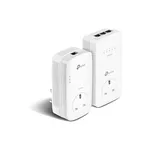
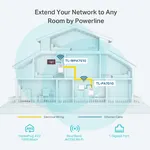
The core of the TL-WPA4220KIT system is its utilization of HomePlug AV technology, which facilitates data transmission over electrical lines at speeds of up to 600Mbps. This theoretical maximum speed is a significant factor for users looking to stream high-definition content, engage in online gaming, or conduct large file transfers without the latency often associated with wireless-only solutions. The kit includes two adapters: one acting as the primary bridge connected to your router and the other serving as a Wi-Fi hotspot in a remote location.
Wi-Fi Extension and Ease of Use
The integrated Wi-Fi functionality of the TL-WPA4220KIT is a key differentiator. It allows users to create a new wireless network or extend an existing one, providing convenient wireless access where it's most needed. The setup process is designed for simplicity, often involving a plug-and-play approach with a push-button pairing mechanism for secure network creation. This ease of use, combined with the potential for high-speed data transfer over power lines, positions the TP-Link TL-WPA4220KIT as a practical solution for enhancing home network coverage and performance.
Pros & Cons
Pros
What we love about this product
- Powerline 600Mbps Standard: Utilizes HomePlug AV technology for theoretical data transfer speeds up to 600Mbps over electrical wiring, suitable for high-bandwidth activities.
- Integrated Wi-Fi Extension: The secondary adapter broadcasts a Wi-Fi signal, effectively extending wireless coverage to previously underserved areas without additional complex setups.
- Simplified Setup: Features a push-button pairing function for easy and secure connection between powerline adapters, minimizing technical configuration.
- Plug-and-Play Convenience: Basic setup involves simply plugging the adapters into wall sockets, making it accessible for users with limited networking expertise.
Cons
Points to consider before buying
- Theoretical Speed Limitations: Actual speeds can be significantly lower than the 600Mbps headline due to electrical wiring quality, distance, and interference from other appliances.
- Wi-Fi Standard: The Wi-Fi standard supported by the extender may be older, potentially limiting the maximum wireless speeds achievable compared to newer Wi-Fi 6 or 6E devices.
- Requires Electrical Outlets: Functionality is dependent on the availability and quality of electrical outlets; cannot function across different electrical circuits without potential performance degradation or failure.