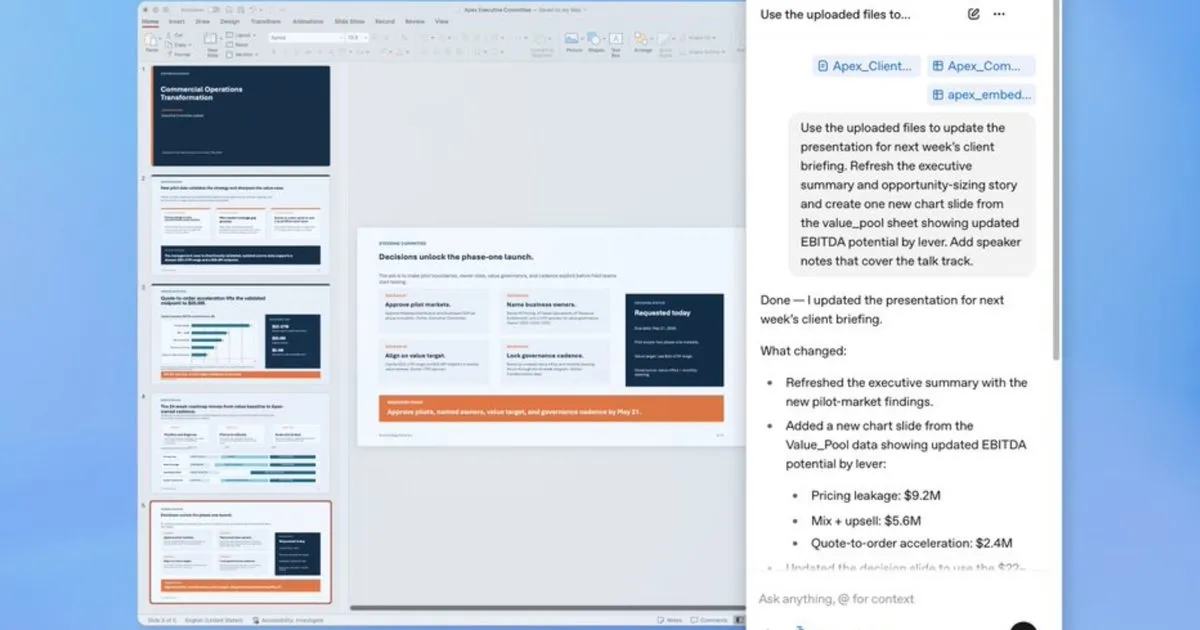
Creating effective presentations often involves a significant time investment in structuring content and refining slide order, diverting focus from the core ideas. Recognizing this challenge, OpenAI has introduced a beta integration that places ChatGPT directly within Microsoft PowerPoint. This new feature aims to streamline the presentation development process by leveraging conversational AI, and it is accessible to users across all major ChatGPT subscription tiers.
The integration allows users to generate and edit presentations without leaving the PowerPoint interface. This means that tasks such as building an initial deck from scratch, incorporating new slides, or revising existing ones can be handled by the AI assistant. The capability extends to analyzing existing presentations, with ChatGPT capable of identifying logical inconsistencies, potential content gaps, and anticipating audience questions, thereby enhancing the overall quality and effectiveness of the presentation.
ChatGPT for PowerPoint Capabilities
ChatGPT for PowerPoint enables users to construct presentations by providing a simple description of their needs. The AI can utilize various source materials, including user notes, documents, spreadsheets, or images, to generate a foundational structure for the presentation. This automated structuring process significantly reduces the initial effort required to begin a new deck.
Furthermore, the tool facilitates the modification of existing slides or the addition of new ones within a presentation without the need to rebuild the entire deck. For critical business meetings, users can employ ChatGPT’s analytical capabilities to scrutinize their presentations. By applying its reasoning abilities, the AI can pinpoint areas where the narrative might be weak, where the logical flow falters, or anticipate potential inquiries from an audience or client, thus ensuring a more robust and persuasive final product.
Distinguishing Features from Similar Tools
While functionalities may overlap with other AI assistants like Microsoft Copilot, ChatGPT for PowerPoint offers a key differentiator: enhanced connectivity. This integration allows ChatGPT to access and incorporate live data directly from services such as Gmail, Outlook, and SharePoint.
This direct access to real-time information eliminates the manual process of copying and pasting data. For business use cases like Quarterly Business Reviews (QBRs) or client briefings, presentations can dynamically reference up-to-date information that teams have already been working with. This seamless data integration is particularly valuable for applications requiring current metrics and insights, ensuring that presentations are both informative and reflect the latest available data.
Business Workflow Applications
OpenAI has specifically designed the ChatGPT for PowerPoint integration to address common business workflows. It is positioned as a tool for creating presentations for quarterly reviews, board updates, and strategic planning sessions, where accuracy and efficiency are paramount.
The beta version of this feature is available globally to users on Free, Plus, Pro, Business, Enterprise, and education plans. Installation is straightforward, accessible either directly from the Microsoft marketplace or from within the PowerPoint application itself. This broad availability ensures that a wide range of users can benefit from the enhanced presentation capabilities.
Competitive Landscape in AI Presentation Tools
With the introduction of ChatGPT for PowerPoint, users now have a more diverse set of options for AI-assisted slide creation and editing. Alongside ChatGPT, users can also consider tools like Claude, which also offers integration capabilities for presentation software, and Microsoft Copilot, which provides AI assistance across Microsoft's suite of productivity applications.
The availability of multiple AI-powered solutions signifies a growing trend in leveraging artificial intelligence to automate and enhance traditionally time-consuming tasks within professional environments. Each tool offers unique strengths, catering to different user preferences and specific workflow requirements, ultimately providing professionals with more choices to optimize their productivity.
Impact Analysis
The integration of ChatGPT directly into PowerPoint represents a significant step forward in making AI tools more accessible and functional within standard professional software. By embedding advanced AI capabilities into a widely used application like PowerPoint, OpenAI is democratizing sophisticated presentation design and analysis. This move not only promises to save professionals considerable time but also has the potential to elevate the quality of business communications by enabling data-driven narratives and logical consistency previously difficult to achieve consistently.