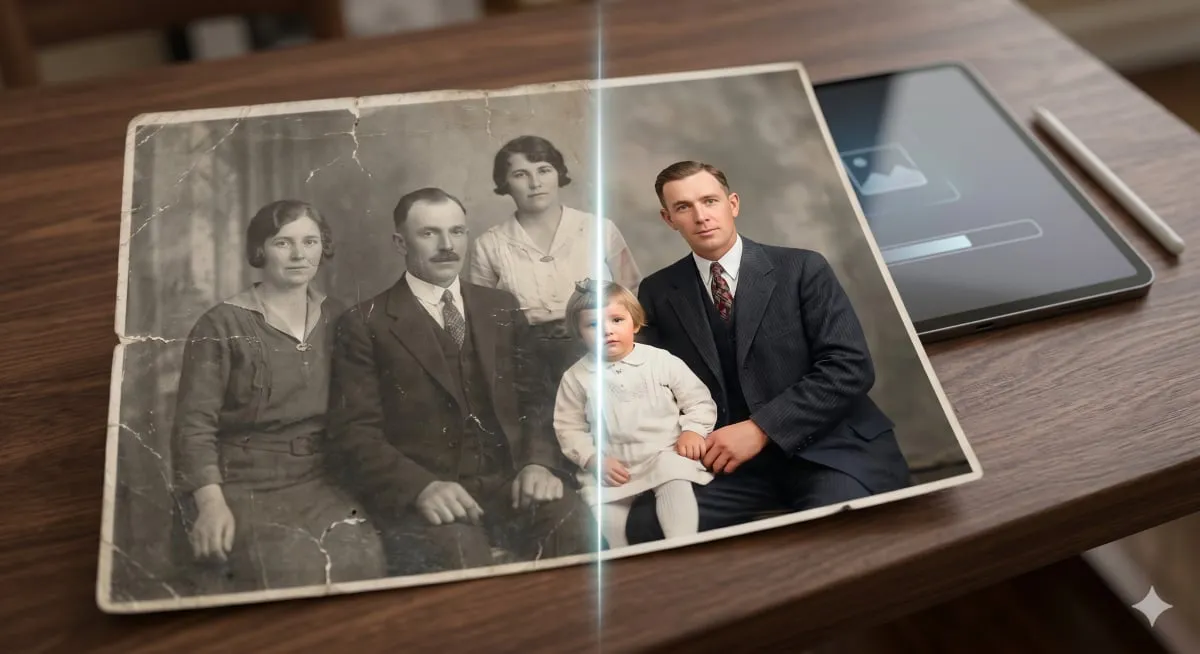
Old photographs serve as invaluable windows into our personal histories, capturing fleeting moments, forgotten fashions, and cherished faces. However, the ravages of time—fading, tearing, scratching, and yellowing—can significantly degrade these irreplaceable artifacts. Historically, restoring such images required specialized skills and substantial financial investment, often involving professional graphic designers. The advent of advanced AI technologies, including large language models with image processing capabilities like ChatGPT and Google Gemini, has democratized this process. Now, individuals can achieve remarkable photo restoration results using carefully constructed text prompts, bypassing the need for complex software or technical expertise.
The efficacy of AI-driven photo restoration hinges entirely on the precision and detail of the user's instructions, known as prompts. Vague commands yield superficial outcomes, whereas well-crafted prompts can guide AI models to perform intricate tasks with impressive accuracy. This guide details six specialized AI prompts engineered to address the most common challenges faced by old photographs. Each prompt is designed to tackle specific degradation issues, drawing upon principles of image restoration, professional photography, and effective AI communication, making advanced restoration accessible to everyone.
Comprehensive AI Photo Restoration
The "Complete One-Shot Restoration" prompt is engineered to address a wide spectrum of common issues found in aged photographs. This single instruction enables AI models to simultaneously tackle problems such as lack of sharpness, color degradation, physical damage like scratches and tears, image noise, film grain, and low resolution. Its comprehensive nature makes it ideal for users uncertain about the specific ailments affecting their old photos, allowing the AI to conduct a holistic analysis and apply a full suite of corrections. A crucial element of this prompt is the directive to "preserve identity," which ensures that facial features are restored authentically without artificial alteration, maintaining the subject's likeness.
For individuals new to AI photo restoration, this prompt offers a robust and highly effective starting point. It demystifies the process by consolidating multiple restoration needs into a single, actionable command. The AI's ability to intelligently reconstruct damaged or missing areas by harmonizing with surrounding textures and tones, coupled with its capacity to restore faded colors to historically appropriate vibrancy, makes it a powerful tool. Furthermore, the prompt's emphasis on optimizing brightness and contrast ensures clarity throughout the image, preventing detail loss in highlights and shadows, and ultimately delivering a high-resolution, photorealistic result that mimics a professionally restored print.
“Restore this photograph comprehensively and professionally. Analyze every visible form of damage or degradation, including scratches, tears, creases, stains, fading, discoloration, blur, noise, and grain and correct each one carefully. Sharpen soft edges and facial features naturally, without over-processing. Repair or reconstruct any missing areas by intelligently matching the surrounding textures, colors, and tones. Where colors have faded, restore them to vibrant, realistic values that suit the original era of the photo. Adjust brightness and contrast so that all areas of the image are clearly visible, with no blown-out highlights or lost shadow detail. Preserve the complete facial identity and natural likeness of every person in the image without alteration. Upscale the final output to the highest possible resolution — Full HD or above — with a clean, photo-realistic finish that looks like a professionally restored print.”
Professional Portrait Enhancement with AI
Portrait photographs hold particular emotional significance, and restoring them often aims not just to fix damage but to elevate the image to the caliber of a professional studio capture. This prompt leverages specific high-end camera references, such as the Canon EOS R5 or Sony A1, to guide the AI towards achieving a particular aesthetic standard. These camera models are recognized for their superior color science, particularly in rendering natural skin tones, creating a pleasing depth of field, and delivering sharp yet organic detail—qualities that translate into exceptionally lifelike portraits.
Utilizing this prompt can yield profoundly striking results, especially for portraits where the subject's face is the central emotional element. The AI meticulously reconstructs skin textures, enhances eye clarity, refines hair and fabric details, and imbues the image with a warmth and dimensionality reminiscent of contemporary professional photography. The core instruction is to restore the existing features authentically, avoiding any changes to the subject's age or facial structure, thereby producing an image that appears to have been captured with advanced photographic equipment from the outset. The prompt also specifies upscaling to a minimum of 4K resolution, ensuring smooth tonal gradations and a polished finish suitable for high-quality prints.
“Restore and enhance this portrait photograph to the visual quality standard of a professional studio shoot captured on a Canon EOS R5 mirrorless camera. Remove all visible damage including scratches, tears, grain, noise, blur, and discoloration. Restore accurate, natural skin tones with lifelike texture — pores, fine lines, and natural variations should be visible but refined. Sharpen the eyes to achieve a natural sparkle and clarity without artificial enhancement. Define hair strands and clothing fabric naturally. Do not alter the person’s actual facial structure, age, or identity in any way — restore what is already there, do not recreate or beautify. Correct the color balance so that whites are white, shadows retain detail, and the overall palette feels warm and naturally lit. Upscale to a minimum of 4K resolution with smooth tonal gradations and a finish consistent with a high-end professional portrait print.”
Authentic AI Colorization for Old Photos
The transformation of a black-and-white photograph into a color image can be one of the most emotionally resonant aspects of photo restoration. Suddenly, the subtle hues of a person's eyes, the natural shades of wooden furniture, or the specific tones of a uniform can bring a historical image to life, making it feel immediate and relatable. However, achieving authentic colorization is technically challenging, as poorly executed attempts can result in artificial or garish appearances.
This prompt prioritizes historical plausibility and natural realism over dramatic effects. It instructs the AI to utilize its knowledge of historical color palettes, typical lighting conditions of different eras, and accurate skin tone reproduction. The aim is to generate colors that are not merely invented but are contextually appropriate for the photograph's period—for instance, suggesting muted earth tones for early 20th-century attire or brighter, synthetic colors for mid-century designs. The prompt also stresses the importance of preserving the original image's tonal depth, ensuring that shadows and highlights remain intact after color is applied, thus avoiding a flattened, artificial look. The final output is designed to appear as if the original photograph was taken with a color camera, rather than digitally painted over.
“Colorize this black and white photograph with careful attention to historical accuracy and natural realism. Use your knowledge of the photo’s approximate era to apply period-appropriate colors to clothing, furnishings, vehicles, and environmental elements, for example, muted earth tones and wool fabrics for early 20th century, or brighter synthetic colors for mid-century modern periods. Apply realistic, natural skin tones to all people in the image, with subtle variations for light sources and shadow. Preserve all shadows, highlights, and tonal depth from the original monochrome image; do not flatten the lighting when adding color. Ensure the sky, foliage, and architectural elements receive colors that are plausible for the scene’s location and season. The final colorized image should feel as though the original photographer had a color camera, not as though a digital painting was applied on top of a photo. Clean up any existing scratches, grain, or damage during the process and output in the highest available resolution.”
Impact Analysis
The increasing accessibility of sophisticated AI tools for photo restoration signifies a profound shift in how individuals can engage with their personal and historical archives. Previously, preserving the integrity and visual fidelity of aging photographs was a specialized and often costly endeavor. Now, by leveraging advanced AI models through carefully crafted prompts, anyone can perform complex restoration tasks, including sharpening, colorization, and damage repair, from their own devices. This democratization of digital preservation empowers individuals to safeguard their memories more effectively and reconnect with their past in vivid detail. Furthermore, it highlights the growing trend of AI systems moving beyond purely analytical tasks to become creative and restorative tools, opening new avenues for cultural heritage preservation and personal storytelling.