Navigating and inserting emojis on macOS can often feel less intuitive than on iOS or iPadOS. While Apple provides a keyboard shortcut (Control + Command + Space) and a Globe/fn key toggle, these methods can be cumbersome or difficult to remember for many users. This friction in accessing a common communication tool highlights a gap in the native macOS user experience. Enhancing this interaction is crucial for users who frequently incorporate emojis into their digital conversations and content creation.
To address this, a new, free utility named Mojito has emerged, offering a streamlined approach to emoji selection directly from the Mac menu bar. Mojito aims to simplify the process, making it as effortless as typing text on an iPhone. The application is designed to be lightweight and unobtrusive, integrating seamlessly into the macOS workflow without requiring complex configurations or offering paid upgrades, thus providing a direct and accessible solution for a common user pain point.
Mojito: A Streamlined Emoji Picker for macOS
Mojito operates as a minimalist utility that resides in the system's menu bar, making it readily accessible across all applications. Its core functionality mimics the predictive text behavior seen in messaging platforms and other applications, allowing users to insert emojis by typing their names enclosed in colons. For instance, typing `:smile:` would bring up relevant emoji suggestions, and pressing Enter completes the insertion. This keyboard-centric approach bypasses the need for mouse-based selection, significantly speeding up the emoji input process for users who prefer keyboard shortcuts.

The utility is developed with a focus on simplicity and efficiency, ensuring it doesn't consume significant system resources. Its free availability and lack of in-app purchases make it an accessible tool for all Mac users. Initial setup is straightforward, and the application functions reliably as advertised, providing a dependable way to enhance emoji usage. Users can customize certain aspects of Mojito's behavior through its settings panel, tailoring the experience to their specific needs and preferences.
Seamless Integration and Customization
Unlike the native macOS emoji picker, which can sometimes feel buried or slow to load, Mojito offers immediate access. Its presence in the menu bar means it's always just a few keystrokes away. The developers have focused on creating an experience that feels natural and integrated with the operating system. The convention of using colons to denote emoji names is widely recognized, making Mojito intuitive for users already familiar with similar systems in other applications, such as Slack or Discord.
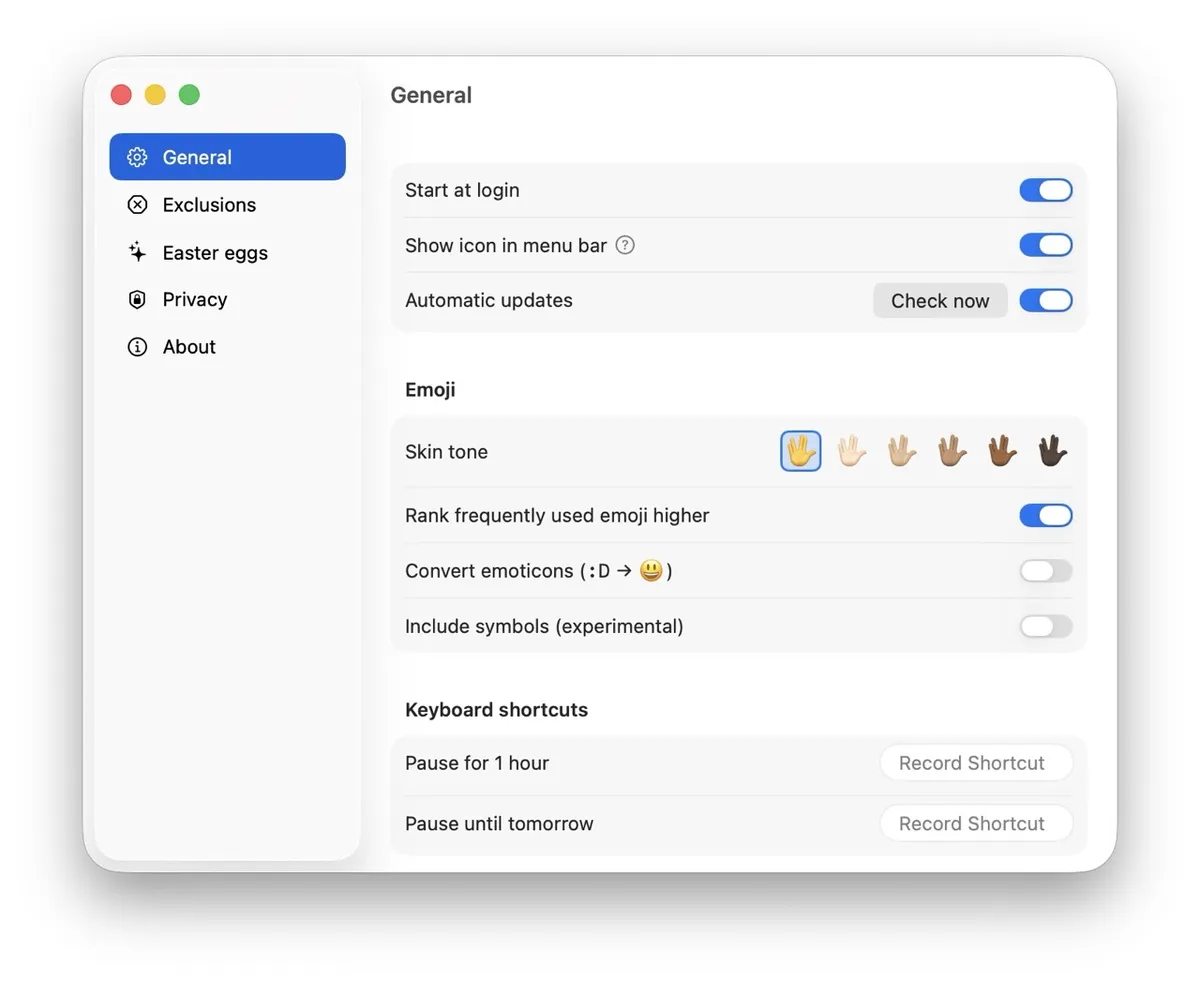
Beyond its core functionality, Mojito offers a degree of customization that allows users to fine-tune its operation. While specific settings are not detailed, this typically includes options for appearance, trigger behavior, or potentially managing frequently used emojis. This flexibility ensures that the utility can adapt to various user workflows, further solidifying its utility as a practical addition to the Mac user toolkit. The commitment to providing these features in a free application underscores a user-centric design philosophy.
Comparison with Native macOS Emoji Input
The traditional method of accessing emojis on macOS involves either the aforementioned Control + Command + Space shortcut or double-pressing the Globe/fn key, which brings up a character viewer. While functional, these methods are often criticized for their discoverability and speed. The character viewer, in particular, can be slow to populate, requires precise navigation with the mouse or arrow keys, and doesn't offer the immediate, context-aware suggestions that Mojito provides. The discontinuation of the Touch Bar on newer MacBook Pro models further removed a tactile and visually intuitive emoji input method for some users.

Mojito's keyboard-driven, text-based input method directly contrasts with the more graphical or shortcut-dependent native options. By leveraging simple text commands, it offers a faster and more direct pathway to emoji insertion. This design choice aligns with power-user preferences for efficiency and minimizes context switching, allowing users to maintain focus on their primary tasks. The utility's presence in the menu bar also makes it more discoverable than a keyboard shortcut that many users might not even be aware of.
Availability and Future Potential
Mojito is available for download and further information can be found via its official website. As a free and open-source initiative (or at least free, based on the description), it represents a community-driven effort to improve a specific aspect of the macOS user experience. The developers have indicated potential for future enhancements, possibly including cursor-based selection or expanded search capabilities, suggesting an ongoing commitment to refining the tool.

The success and adoption of Mojito could potentially influence Apple to reconsider its native emoji input methods in future macOS updates. By demonstrating a clear demand for a more efficient and user-friendly system, Mojito serves as a practical example of how such features can be implemented. Its lightweight nature and free distribution make it an ideal solution for users seeking immediate improvements without resorting to paid software or complex system modifications.
Impact Analysis
The introduction of utilities like Mojito underscores a persistent user desire for enhanced functionality in macOS, particularly in areas where native implementation may lag behind user expectations or the intuitive experiences found on other Apple platforms. For users who frequently integrate emojis into their communication, Mojito offers a tangible improvement in workflow efficiency. Its success could also encourage further third-party development focused on enhancing core macOS features, potentially prompting Apple to address these user-requested improvements in future operating system updates. The accessibility of this free tool means a broad range of users can benefit from a more streamlined digital communication experience.